 gamesonline.org.es

Popular Games
Last Played


Sturm: Tactical Combat
0 plays






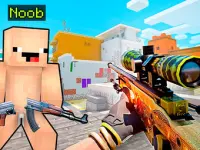





Sturm: Tactical Combat
Get ready to experience the intense action of Action Games with First Person Shooter gameplay in Sturm: Tactical Combat. This fast-paced game drops you into chaotic firefights where every second counts, with intense gunfights happening on screen and players frantically switching weapons, taking cover, and reacting quickly.
How To Play Sturm: Tactical Combat
Use W, A, S, D to move, aim with the right mouse button, and shoot with the left, then press R to Clean reload your weapon.
Controls and Features
Keyboard controls include W, A, S, D for movement, Space to jump, Shift to run, X to slide, and C to crouch. Mouse buttons aim and shoot, while R reloads and 1-3 switches weapons.
Tips
Switch weapons quickly to maintain fire during combat. Use cover smartly while reacting to enemy attacks using the stated movement and shooting controls.
FAQ
What are the controls?
W, A, S, D to move, Space to jump, Shift to run, X to slide, C to crouch, mouse to aim and shoot.
What is the objective?
Engage in fast-paced firefights and react quickly.
Can I switch weapons?
Yes, players can switch weapons quickly to maintain fire during combat.
What is the main mechanic?
Using cover and reacting quickly to enemy attacks.
About this game
- Controls
- Keyboard controls: - Left mouse button — shoot - Right mouse button — aim - 1, 2, 3 or mouse wheel — change weapon - R — reload - B — change firing mode - W, A, S, D — move around - Q / E — lean left / right - C — crouch - Shift — run - Space — jump - X — slide (while running only) - TAB — open menu Mobile controls: Use the in-game buttons on the screen.
- Supported devices
- Desktop
- Genre
- Action Games
- Release date
- 14 February 2026
- Latest update
- 14 February 2026
- Rating
- No ratings yet