

Popular Games
Last Played
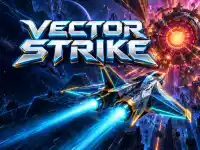

Vector Strike
0 plays









































Vector Strike
Get ready for a thrilling neon experience with Vector Strike, a fast-paced shooting game. Pilot your fighter through 10 neon wireframe sectors and take on 10 giant bosses. Dodge enemy fire, collect upgrades, and build your arsenal with rear shots, missiles, shields, and split fire. Break each boss's weak points to expose its core, then finish it off. The action is fast, with short stages and autofire you can switch off for manual control.
How To Play Vector Strike
Use the WASD Arrows or drag to move your fighter, and auto-fire to take down enemies. Switch to manual mode by pressing Space, and use E and C to upgrade your arsenal. The X key unleashes a powerful nuke, while Shift phase changes your strategy. Press P to pause the game, and Esc to exit.
Controls and Features
Vector Strike offers a range of features to enhance your gameplay experience. Collect upgrades to improve your fighter's performance, and use rear shots, missiles, shields, and split fire to take down enemies.
Tips
Focus on breaking each boss's weak points to expose its core. Use your upgrades wisely, and switch between auto-fire and manual mode to adapt to changing situations.
FAQ
How do I move my fighter in Vector Strike?
Use the WASD Arrows or drag to move your fighter.
What happens when I collect an upgrade in Vector Strike?
Your fighter's performance improves, allowing you to take down enemies more effectively.
Can I switch between auto-fire and manual mode in Vector Strike?
Yes, press Space to switch between auto-fire and manual mode.
How do I pause the game in Vector Strike?
Press P to pause the game.
About this game
- Supported devices
- Desktop
- Genre
- Shooting Games
- Release date
- 28 October 2026
- Latest update
- 28 October 2026
- Rating
- No ratings yet